

Storage usage
Monitor total hosted storage used against your current plan before you hit upload or hosting limits.
Overview
Mappinest tracks your total hosted storage in the console so you can monitor usage before you reach your plan limit. This includes all tilesets and datasets currently stored under your account.
This page explains where to view storage usage, what the storage card shows, how limits differ by plan, and what happens when you reach the limit.
View usage in the console
The hosted storage card appears at the top of the Tilesets page. It updates each time you upload or delete a tileset.
Storage usage card
The storage card shows used space, total plan allowance, and remaining available storage.
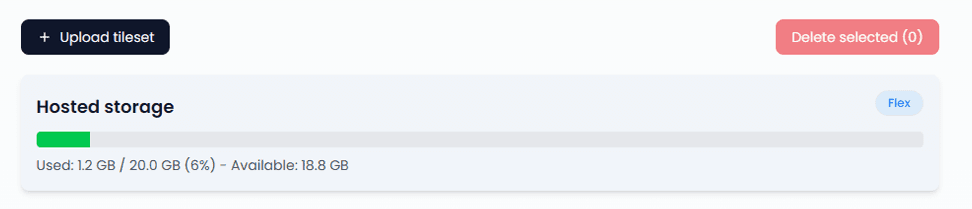
What the storage card shows
- Used - total hosted storage currently counted against your account
- Total allowance - the maximum hosted storage included in your current plan
- Remaining - available space before you hit the plan limit
Storage limits by plan
Total hosted storage and per-file upload size are plan-based. Free includes 5 GB of total hosted storage, and Flex includes 20 GB. See the pricing page for full details.
A small file can still require a higher plan if individual tile payloads are very large, if raster tiles use high resolution, or if vector layers contain many attributes. See Upload Data for the detailed vector and raster limits.
Storage pricing
- Measured by the total size of the tilesets and datasets currently stored in your account
- Plan based on total hosted storage
- See current storage allowances in the pricing page's Data section.
Uploading a tileset or a dataset increases hosted storage usage. Editing a stored dataset can increase or decrease usage as features and attributes are added, changed, or removed. Deleting a tileset or dataset removes its stored size from the displayed total.
What happens when you reach the limit
Once your total hosted storage reaches the Free plan limit, upgrade to Flex to raise the allowance to 20 GB. If you need more than 20 GB of hosted storage or custom ingest terms, contact us to agree Pro terms.
Last updated: August 27, 2026